
If you’ve searched for IPTV encoder and landed here, there’s a good chance one of two things is true: you’re trying to understand what the term actually means, or you’re planning to broadcast your own live channel and need to know what hardware to buy. This guide covers both.
We’ll explain exactly what an IPTV encoder does, how it fits into the streaming chain, the different types you’ll come across, and, importantly, whether you, as a viewer, actually need one at all. No jargon dumps, no unverified numbers, just a clear explanation.
Do You Actually Need an IPTV Encoder?
Before going further, it’s worth clearing up something a lot of guides skip: if you’re simply trying to watch live channels and movies, you don’t need an encoder at all. Encoders are used by the people creating and broadcasting a channel, not by the people watching it.
As a viewer, what you actually interact with is a decoder, usually built into your IPTV app, smart TV, or set-top box. The encoding work happens entirely on the provider’s end; all you need is a compatible app and a stable internet connection.
If you are the one building a channel for a business, an event, a church, or a personal project, the rest of this guide is for you.
What Is an IPTV Encoder?
An IPTV encoder is a hardware device or software tool that captures a raw video signal from a camera, a switcher, a set-top box, or a media server and compresses it into a smaller digital format suitable for streaming over the internet or a private network.
Raw, uncompressed video is far too large to send over a normal internet connection in real time. The encoder’s job is to shrink that file size dramatically, using a video codec, while keeping the picture looking as close to the original as possible. Once compressed, the video is packaged into a streaming format and sent onward to a media server, which then distributes it to viewers.
In short: camera or source → encoder → compressed stream → media server → viewer’s app or decoder.
IPTV Encoder vs. IPTV Decoder: What’s the Difference?
These two terms get mixed up constantly, so here’s the simplest way to remember the difference:
- Encoder = start of the chain. Converts raw video into a compressed stream. Used by broadcasters and channel owners.
- Decoder = end of the chain. Takes a compressed stream and converts it back into a picture you can watch. Used by viewers, usually as a set-top box or app.
You can think of it like a sealed envelope: the encoder seals the letter (compresses the video), it travels through the mail (the internet), and the decoder opens it back up (decompresses it) so it can be read.
How Does an IPTV Encoder Work?
The encoding process generally happens in four stages:
- Capture – The encoder receives a video signal, usually through an HDMI or SDI input, though older devices sometimes use analog inputs.
- Compress – A video codec — most commonly H.264 (AVC) or the newer H.265 (HEVC) — reduces the file size while preserving as much visual detail as possible.
- Package – The compressed video is wrapped into a delivery format, such as HLS (.m3u8), RTMP, RTSP, or UDP/RTP, depending on where the stream is headed.
- Transmit – The finished stream is sent to a media server, CDN, or IPTV middleware, which then distributes it to viewers’ apps and devices.
This whole pipeline runs in real time. Depending on the encoder and protocol used, the delay between the live source and the viewer’s screen can range from under a second (with low-latency protocols) to well over 15–30 seconds with standard HLS delivery — which is why encoder and protocol choice matters so much for live sports.
Types of IPTV Encoders
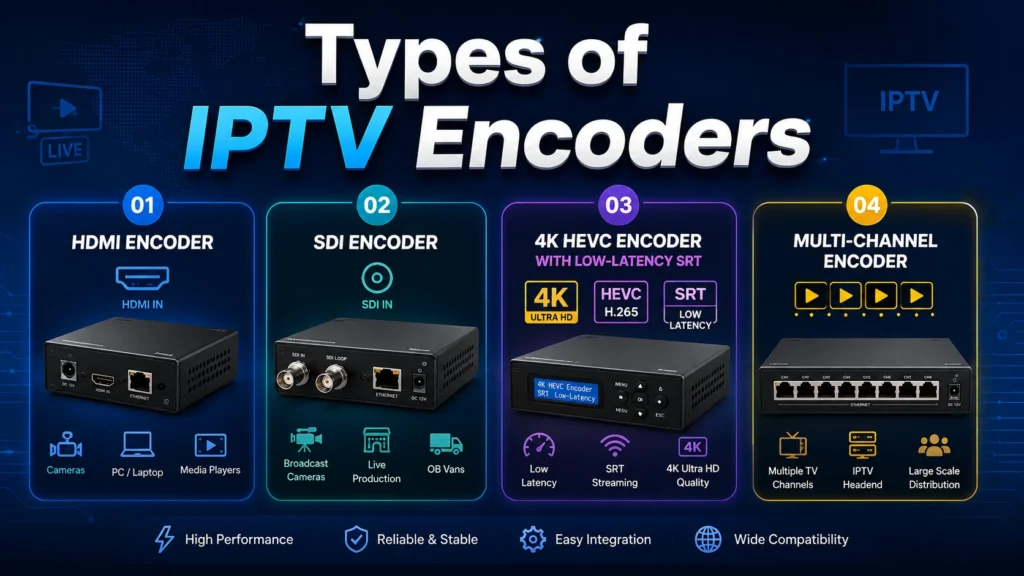
HDMI Encoder
An HDMI encoder is the most common starting point for small productions. It takes a standard HDMI source — a camera, a game console, a laptop, or a set-top box — and converts it into an IP stream. It’s usually compact, affordable, and increasingly supports 4K input even at the budget end.
SDI Encoder
SDI encoders are the standard in professional broadcast environments — TV studios, stadiums, and production trucks — because SDI cabling holds up over much longer distances than HDMI without losing signal quality. Many current encoder models now include both HDMI and SDI inputs on a single unit.
4K HEVC Encoder with Low-Latency SRT
For higher-end deployments, a 4K encoder using the H.265/HEVC codec has become the standard choice. HEVC generally delivers similar visual quality to H.264 at roughly half the bitrate, which matters when you’re distributing many channels or 4K content on limited bandwidth. Pairing this with SRT (Secure Reliable Transport) — a protocol built to recover lost data packets and keep the connection encrypted and stable — makes it a strong choice for sending a feed over the open internet rather than a dedicated line.
Multi-Channel Encoder
Larger setups — hotel IPTV systems, multi-camera venues, or headends running many channels — typically use a multi-channel unit. Depending on the hardware, these can handle anywhere from 4 to 24+ simultaneous HDMI or SDI inputs, each output as its own independent stream. This cuts down significantly on rack space and power use compared to running one encoder per channel.
HDMI vs. SDI vs. Multi-Channel: Quick Comparison
| Encoder Type | Best For | Cable Distance | Typical User |
|---|---|---|---|
| HDMI Encoder | Home, small business, single camera | Short to medium | Beginners |
| SDI Encoder | Studios, stadiums, live production | Long distance | Broadcast professionals |
| 4K HEVC + SRT | High quality over unstable internet | Varies | Mid to advanced |
| Multi-Channel (4–24 inputs) | Hotels, multi-camera venues, headends | Varies | Advanced / enterprise |
Recommended Encoder Settings (Starting Points)
These are commonly used starting points rather than fixed rules — actual settings depend on your content, internet speed, and target devices:
| Setting | Typical Range |
|---|---|
| Codec | H.265/HEVC for 4K and bandwidth-limited streams; H.264 for maximum device compatibility |
| Resolution | 1080p is still the most common target; 4K where bandwidth allows |
| Frame rate | 25fps or 30fps for standard content; 50fps or 60fps for fast-motion sports |
| Audio codec | AAC, typically 128–256 kbps |
| Transport protocol | HLS for broad app compatibility; RTMP or SRT for low-latency delivery |
Fast-motion content like sports needs a higher bitrate than static content like a slideshow or a talking-head interview, even at the same resolution.
Hardware Encoder vs. Software Encoder
Hardware encoders are dedicated physical devices built specifically for encoding. They tend to run reliably for continuous, unattended operation and don’t compete with other programs for processing power a real concern for 24/7 channels.
Software encoders, such as OBS or FFmpeg, run on a general-purpose computer. They offer more flexibility for graphics overlays, switching between multiple sources, and custom workflows, but they depend on the computer’s processing power and need more hands-on management.
Most operations running a stable, ongoing channel lineup lean on hardware encoders, while software encoders are popular for one-off streams, events, or content creation where flexibility matters more than 24/7 uptime.
What to Check Before Buying an IPTV Encoder
- Input type – HDMI, SDI, or both, matching your camera or source equipment
- Codec support – H.264 for compatibility, H.265/HEVC for smaller file sizes
- Resolution – 1080p is the safe standard; check for 4K if you plan to scale up
- Latency – Lower is better, especially for live sports or interactive events
- Protocol support – HLS for broad player compatibility, SRT or RTMP for contribution feeds
- Channel density – A single-channel unit is enough for most individual users; multi-channel units suit larger setups
- Network output – Check whether you need unicast (one viewer per stream) or multicast (shared distribution, common in hotels)
Some well-known names in this space include Haivision, Kiloview, Magewell, TBS, and PVI, spanning everything from budget single-channel boxes to professional broadcast-grade units — worth researching directly against your specific use case and budget before buying.
Where the Encoder Fits Into the Bigger Picture
The encoder is only the first link in the chain. Once a channel is encoded, it moves to a media server or middleware platform, gets organized into a playlist, and is finally delivered to viewers’ devices through an app or set-top box acting as the decoder.
Frequently Asked Questions
-
Do I need an IPTV encoder just to watch IPTV?
No. Encoders are used by whoever creates and broadcasts a channel. As a viewer, you only need a decoder, which is typically built into your IPTV app or set-top box.
-
What is the difference between an IPTV encoder and a decoder?
An encoder compresses raw video into a stream at the source. A decoder does the reverse — it unpacks that stream so it can be displayed on a TV, phone, or other device.
-
Is H.265 (HEVC) better than H.264 for IPTV?
For the same visual quality, HEVC generally uses roughly half the bitrate of H.264, which helps when bandwidth is limited or when streaming 4K. The trade-off is that HEVC needs more decoding power, and a few older devices don’t support it.
-
Can I use a regular computer instead of a dedicated encoder?
Yes, software like OBS or FFmpeg can encode video on a standard computer. A dedicated hardware encoder is generally more reliable for continuous, unattended streaming.
-
What is SRT and do I need it?
SRT (Secure Reliable Transport) is a protocol that recovers lost data packets and keeps a stream stable and encrypted over unpredictable internet connections. It’s most useful when sending a live feed over the public internet rather than a dedicated, controlled network.
Final Verdict
An IPTV encoder is the starting point of every live stream: the device that turns a camera or box signal into something a viewer’s app or TV can actually play. If you’re just watching IPTV, you can skip all of this entirely; that part is the provider’s job. If you’re building a channel, a simple HDMI encoder covers most home and small business needs, an SDI encoder makes sense for studio-grade setups, and a 4K HEVC encoder with SRT support is worth it when quality and bandwidth both matter.