
Key Takeaways
- Pulse IPTV is an IPTV reseller that sells live channel and VOD access in one-time payment plans for 1 to 12 months, priced from €20/month down to €5.42/month on the 12-month plan (1-device tier, per pulseiptv.com pricing).
- It does not provide its own app. You pick your own IPTV player and load in the login details Pulse sends you after payment.
- The “Free Trial” button on the site links to a WhatsApp chat, not a self-serve trial length, channel access, and terms of any trial are not published anywhere on the site.
- Pulse IPTV’s Terms of Service do not mention a refund policy of any kind, which is a meaningful gap compared to providers that publish one upfront.
- We could not find a registered company name, business address, or independent third-party reviews (Trustpilot, Reddit, or otherwise) for pulseiptv.com; this review notes that gap rather than filling it with assumptions.
What Is Pulse IPTV?
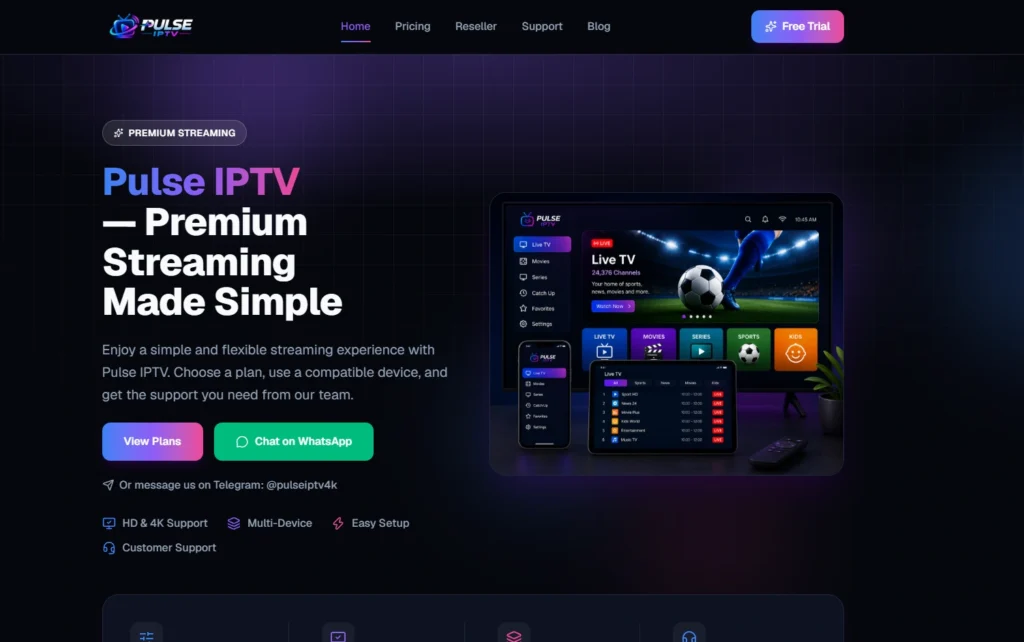
Pulse IPTV, sold at pulseiptv.com, is a subscription-based IPTV (Internet Protocol Television) reseller. Rather than delivering content through a cable box or satellite dish, it sends login details after payment that you enter into a player app on your own device.
According to its own FAQ, Pulse IPTV describes itself as a service that delivers TV channels and on-demand content over an internet connection, accessed through an app or player rather than a satellite dish or cable box. That description is accurate as far as it goes, though it blurs a distinction worth knowing: Pulse sells access to streams, not the software you watch them in. If you’ve mainly used Netflix or Disney+, expect a setup process that works quite differently.
Pulse positions itself around simplicity and direct human support rather than a polished self-service platform: there’s no app store listing, no automated signup form, and every purchase or support request runs through WhatsApp or Telegram. That’s common in this market segment, but it’s worth knowing going in – this isn’t a service you sign up for with a credit card form and instant access.
Pulse IPTV Pricing
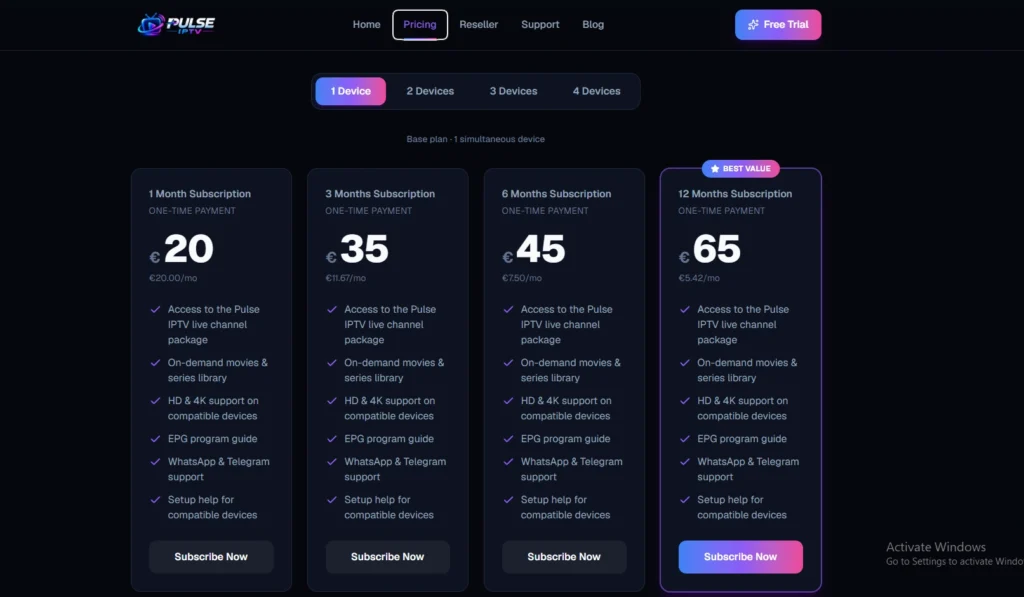
Pulse IPTV sells plans by device count (1, 2, 3, or 4 simultaneous devices) and duration (1, 3, 6, or 12 months), all as one-time payments rather than recurring subscriptions. For the 1-device tier, the published pricing is:
| Plan length | Price | Effective monthly cost |
|---|---|---|
| 1 month | €20 | €20.00/mo |
| 3 months | €35 | €11.67/mo |
| 6 months | €45 | €7.50/mo |
| 12 months | €65 | €5.42/mo |
[Provider-stated] Every tier includes the same feature list: the live channel package, the on-demand movie/series library, HD & 4K support “on compatible devices,” an EPG, and WhatsApp/Telegram support.
What we couldn’t verify: the site’s pricing page has separate tabs for 2, 3, and 4-device plans, but the pricing content behind those tabs wasn’t accessible during our review, so we can’t confirm how much more a multi-device plan costs over the 1-device tier shown above. If a specific device count matters to you, confirm the exact price with Pulse’s team on WhatsApp before paying – the site’s own FAQ says the same, since it’s a plan question, not a technical one.
Pulse also states its pricing page has no hidden fees and no long-term contracts, and its Terms of Service confirm that payments are one-time per plan period rather than auto-renewing. That’s a fair, verifiable claim as written – just note it describes the billing structure, not a guarantee about service quality.
Pulse IPTV Free Trial
Pulse IPTV advertises a “Free Trial” button on every page, but it isn’t a self-serve trial – it opens a WhatsApp chat. Nowhere on the site (homepage, FAQ, pricing, or terms) could we find published trial length, channel limitations, or terms for that trial. In practice, this means:
You’ll need to message Pulse directly to find out what a trial actually includes.
Trial availability, duration, and eligibility are decided case by case rather than published as a policy.
Before you message them, it helps to know what a normal trial looks like: most IPTV free trials run somewhere between a few hours and 48 hours, and better-run providers publish that window rather than negotiating it per customer. A published trial policy is something you can hold a provider to; a WhatsApp conversation isn’t.
Pulse IPTV Channels and Content
[Provider-stated] Pulse’s own copy describes access to a “live channel package” and an “on-demand movies & series library,” plus an EPG (electronic program guide) – the on-screen schedule grid that tells you what’s airing now and next, and the feature most people miss when it’s badly implemented. Its dashboard preview image shows category labels for Live TV, Movies, Series, Sports, and Kids.
What’s missing from the public site is any of the following:
- A published channel count
- A channel list or sample lineup by country/genre
- Confirmation of specific sports leagues or premium channel packages
- Details on how often the on-demand library is refreshed
That last point matters more than it sounds. An on-demand library is only as good as its update schedule – a catalogue that stopped being refreshed two years ago still looks large in a screenshot. Because none of this is published, we’re not going to invent a channel number the way many affiliate “reviews” do. If the exact lineup matters for your use case (a specific sports package, a specific country’s channels), ask Pulse’s support team directly and get it in writing before paying for a longer plan.
Device Compatibility
Pulse IPTV lists the following as compatible device categories: Fire TV & Firestick, Smart TV, Android, iPhone & iPad, Apple TV, Windows & Mac, Android TV boxes, and other “compatible TV boxes.” Its installation guide is consistent across all of them: install a separate, compatible IPTV player app on the device, then enter the login details Pulse sends after payment.
A few things worth understanding before you buy:
- Pulse doesn’t publish a first-party app. Your viewing experience – interface, EPG quality, recording, favourites – comes from whichever IPTV player you choose, not from Pulse. Apple users have fewer player options than Android users do, so check what’s available for your device before buying a plan.
- “Compatible” is broad, not guaranteed. Pulse’s own Terms state that it cannot guarantee compatibility with every device or configuration, and recommend confirming with support first if you’re unsure.
- Smart TVs often need a middle device. Per Pulse’s installation guide, if your TV doesn’t have a native compatible app, you connect a Fire TV Stick, Android TV box, or Apple TV first, then install the player there.
How to Set Up Pulse IPTV
Setup follows the same basic pattern regardless of device:
- Choose a plan and pay through Pulse’s WhatsApp/Telegram checkout.
- Receive your activation details once payment is confirmed.
- Install a compatible IPTV player app on your device (App Store, Google Play, or a sideloaded app on Firestick).
- Open the player and add your account using the details Pulse sent.
- Wait for the channel list and EPG to sync, then start streaming.
One thing Pulse’s guide doesn’t explain is what those “activation details” actually are. They’ll usually arrive as either an M3U link or a set of Xtream Codes: a username, password, and server URL. Knowing which format you’ve been given saves a lot of confusion at step four, because players ask for them differently.
Streaming Performance
Pulse markets HD and 4K support “on compatible devices,” but its own homepage and Terms both qualify that claim: quality depends on your device, your player app, and – critically – your internet connection. We have not tested Pulse IPTV ourselves, and any review claiming to have run a multi-week buffering test on a specific reseller without disclosing methodology should be read with skepticism.
What we can say factually: streaming quality is bottlenecked by speed and network stability on your end at least as much as by the provider. Before blaming any service for buffering, it’s worth checking the internet speed IPTV actually needs – 4K streams need considerably more headroom than most people assume, and a 4-device plan multiplies that requirement.
Is Pulse IPTV Legit and Safe?
This is where we separate three different questions that often get blurred together:
Is Pulse IPTV a legitimate business to deal with? We could not independently confirm a registered company name, business address, or corporate entity behind Pulse IPTV – the site identifies itself only as “Pulse IPTV,” with a Spanish WhatsApp number (+34) as the primary contact method, and its privacy policy names no corporate entity either. That doesn’t automatically mean anything is wrong, but it does mean you’re extending more trust than you would to a business with public registration details, and we couldn’t find independent reviews (Trustpilot, Reddit threads, or otherwise) specifically about pulseiptv.com to cross-check against. Treat this as a genuine open question, not a settled one.
Is IPTV technology itself legal? Yes. Streaming television over an internet connection instead of cable or satellite is a legal delivery method, and the same technology powers legitimate services.
Is everything sold through IPTV resellers legal? This depends entirely on whether the specific content being streamed is properly licensed for redistribution – something outside users’ visibility and outside what any reviewer can verify from a provider’s homepage. Pulse’s Terms don’t make specific licensing claims either way. This uncertainty isn’t unique to Pulse; it applies across the unofficial reseller market generally. If licensing certainty is what you’re actually after, fully licensed services are a different category of product at a different price point – worth knowing before you decide which trade-off you’re making.
Practical safety steps: pay through a method that gives you some recourse rather than an untraceable transfer, given there’s no published refund policy to fall back on. Many IPTV subscribers also run a VPN with their IPTV service, partly for privacy and partly because some ISPs throttle sustained streaming traffic.
Pulse IPTV Pros and Cons
What Pulse IPTV does well, based on its published site:
- Transparent, table-based pricing for the 1-device tier with no auto-renewal
- Broad device coverage across the major platforms (Firestick, Android, iOS, Apple TV, Windows/Mac, Smart TV)
- Direct human support via WhatsApp and Telegram rather than a ticket queue
- Clear step-by-step installation instructions per device category
Where it falls short or leaves questions open:
- No refund policy published anywhere on the site or in its Terms
- Free trial exists only as a WhatsApp conversation, with no published terms
- No channel list, channel count, or VOD catalog details
- Pricing for 2, 3, and 4-device plans isn’t clearly confirmed
- No visible company registration details or independent reviews to cross-check
Who Pulse IPTV Might Suit – and Who Should Look Elsewhere
Pulse IPTV’s documented features point toward a specific kind of user: someone who already understands how IPTV players work, wants flexible short-term plans (starting at one month), and is comfortable managing a purchase and any support issue entirely over WhatsApp or Telegram.
It’s likely a weaker fit if you want a published refund window before paying, a defined free trial with clear terms, a confirmed channel list for a specific sport or country before committing to a longer plan, or a provider with visible business registration and independent reviews to check first.
If a published refund window is your deciding factor, that’s where comparing IPTV services side by side helps – Strive IPTV, for example, publishes a 45-day refund policy in its own terms rather than leaving it to a support chat. And if your subscription lives or dies on one competition being reliable, judge providers on how they hold up during a live match, not on anything a homepage claims.
Final Verdict
-
What is Pulse IPTV?
Pulse IPTV is an IPTV reseller that provides live TV channels and on-demand content through a third-party player app, sold in 1-to-12-month plans.
-
Is Pulse IPTV legit?
Its pricing and device information are published and consistent, but we couldn’t confirm a registered company name or find independent third-party reviews, so treat legitimacy as an open question to verify directly with their support team rather than a settled fact.
-
Is Pulse IPTV safe to use?
IPTV as a technology is legal; the legality of specific redistributed content isn’t something a user or reviewer can verify from the outside. Using a VPN and paying through a traceable method are reasonable precautions.
-
How much does Pulse IPTV cost?
The 1-device tier runs from €20 for one month down to €65 for twelve months (about €5.42/month). Pricing for 2, 3, and 4-device tiers wasn’t confirmable from the published site.
-
Does Pulse IPTV offer a free trial?
There’s a “Free Trial” button, but it opens a WhatsApp chat rather than a self-serve trial, and no trial length or terms are published.
-
What devices does Pulse IPTV support?
Fire TV/Firestick, Android, Android TV boxes, Smart TVs, iPhone/iPad, Apple TV, and Windows/Mac, all via a separate compatible IPTV player app.
-
Does Pulse IPTV work on Firestick?
Yes, according to its installation guide, you install a compatible player from the Amazon Appstore and enter the activation details Pulse provides.
-
Does Pulse IPTV have VOD and an EPG?
Yes, both are listed as included features on every plan, though the size of the VOD library isn’t published.
-
What is Pulse IPTV’s refund policy?
None is published in its Terms of Service or anywhere else on the site as of this review – confirm directly with support before paying for a longer plan.