
Key Takeaways
- It is only a player: iMPlayer does not include channels. You need a provider that gives you an M3U link, Xtream Codes or Stalker/MAG login.
- Use official sources: The Android apps are listed on Google Play under the developer HzApps, and Apple TV and iPhone have an App Store version.
- Firestick needs care: Reputable guides say iMPlayer is not in the Amazon Appstore, so you must sideload it. Newer Fire TV sticks that run Vega OS block sideloading.
- Setup takes minutes: Install, tap Add Playlist, choose M3U, Xtream Codes or Stalker, enter the details and wait for the channels to load.
- Free and premium: A free version exists. Premium is a one-time purchase that one review priced at about $18 to $20 for two devices.
- Skip MOD APKs: Modified files are a common route for malware. Install from the stores or the developer’s own site.
- Legality depends on your source: The app is legal. What you load into it must be licensed.
Searches for “iMPlayer IPTV” mix three different needs: where to download the app, how to set it up and whether it is safe. Many results are provider pages that push a subscription. This guide stays neutral and covers each device step by step.
It is based on store listings, the developer’s site as listed on Google Play and independent reviews as of November 2026. We did not test every device, so steps may differ slightly on your model.
What Is iMPlayer?
iMPlayer is an IPTV player app that plays playlists and Xtream Codes accounts. Its store description calls it a media player for M3U files and certain supported platforms, designed to give a cable-like feel on a TV. If you are new to the topic, our guide on what IPTV is explains the basics.
The app is only a viewer. It is similar to other players in our list of the best IPTV players. You supply the login from your provider, and the app turns it into a channel list, a program guide and on-demand sections.
iMPlayer Versions and Official Sources
Google Play lists two iMPlayer apps by the developer HzApps: one for TV devices and one for phones and tablets. The Apple version is a separate App Store app. Use the table to pick the right one.
| Device | App name | Where to get it |
|---|---|---|
| Android TV, Google TV, Nvidia Shield | iMPlayer TV IPTV Player | Google Play |
| Android phone or tablet | iMPlayer Mobile IPTV Player | Google Play |
| Apple TV, iPhone, iPad | iMPlayer IPTV Player | App Store |
| Fire TV and Firestick | Android file | Developer’s site, by sideloading |
At the time we checked, Google Play showed ratings of about 4.2 for the TV app and 4.6 for the mobile app. Ratings change, so check the current numbers before you install.
Is This the Real iMPlayer?
The developer website listed on Google Play is implayer.tv. Other domains, such as implayer.org and implayer.us, also publish iMPlayer pages. We could not confirm who runs them, and several sell IPTV subscriptions next to the app guide.
Use this quick check before you download anything:
- Prefer Google Play or the App Store whenever the app is available there.
- Use the developer’s own site for Fire TV, and type the address yourself.
- Ignore “downloader codes” shared on random pages. A code only points to a file, and you cannot see what it is.
- Never pay a stranger who offers an “official” premium account.
What You Need Before You Start
- A compatible device, such as an Android TV box, a Firestick, an Apple TV or a phone.
- A stable connection. Our guide to IPTV internet speed explains how much bandwidth you need.
- A login from your provider: an M3U link, Xtream Codes details or a Stalker/MAG portal.
- Your device’s MAC address if you plan to buy premium, because the premium license is linked to it.
If you do not have a provider yet, read how to test one in our guide to the IPTV free trial first.
How to Install iMPlayer on Android TV and Google TV
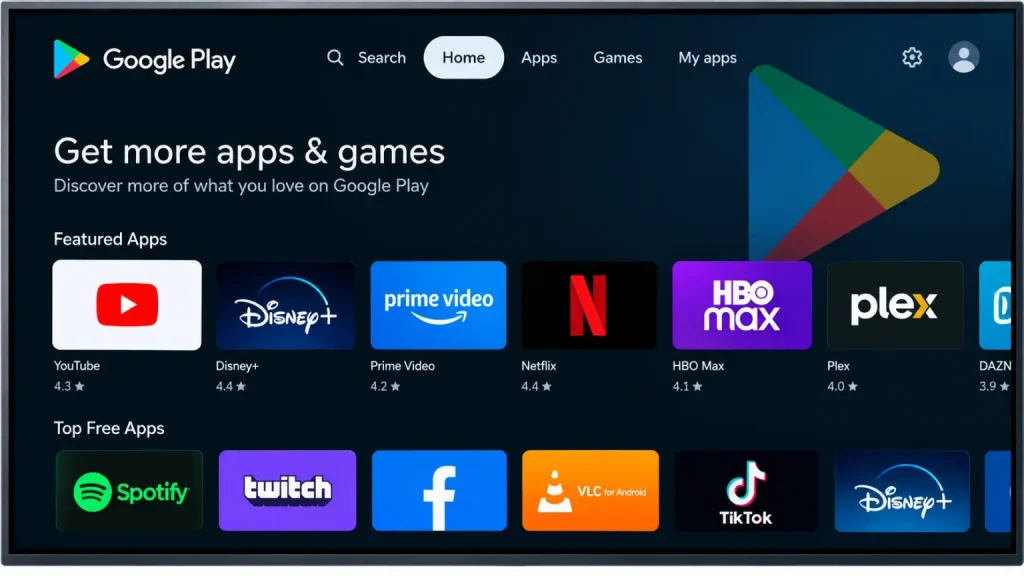
- Open the Google Play Store on your Android TV, Google TV or Nvidia Shield.
- Search for iMPlayer TV IPTV Player by HzApps.
- Select Install, then Open.
- Accept the permissions the app asks for.
- Close the welcome screens and continue to the playlist step below.
For phones and tablets, install iMPlayer Mobile IPTV Player from the same developer instead.
How to Install iMPlayer on a Firestick
Reputable guides, including TROYPOINT, say iMPlayer is not in the Amazon Appstore, so you have to sideload it. Some other guides claim it is listed, so check the Appstore search first. If it is not there, follow these steps:
- Install the Downloader app from the Amazon Appstore.
- Go to Settings, My Fire TV, Developer Options and allow installs from unknown sources for Downloader.
- Open Downloader and enter the developer’s download address from implayer.tv.
- Wait for the file to download, then select Install and Open.
- Delete the installer file afterward to free up space.
Check Your Fire TV Model First
This step is where many guides fail. Amazon’s newer sticks, such as the 2025 Fire TV Stick 4K Select and the 2026 models, run Vega OS. BGR reports that these block sideloading, so the Downloader method will not work on them. The Fire TV Stick 4K Max (2023) and the Fire TV Cube still run Fire OS. A reader comment on TROYPOINT even describes iMPlayer disappearing from a Fire TV and not reinstalling.
How to Install iMPlayer on Apple TV, iPhone and iPad
- Open the App Store on your Apple TV, iPhone or iPad.
- Search for iMPlayer IPTV Player.
- Select Get, then Open.
- Choose Add Playlist and continue below.
For other Apple options, see our guide to the IPTV player for iOS.
How to Add Your IPTV Playlist in iMPlayer
The steps are the same on every device. Only the remote or touch controls differ.
- Open iMPlayer and choose Add Playlist. It appears on first launch, and later you can find it in the settings.
- Pick a login type: M3U URL, Xtream Codes API or Stalker/MAG.
- Enter the details from your provider and select Add.
- Wait while the channels, movies and series load.
- Check the guide and play a channel to test.
| Login type | What you enter | Best for |
|---|---|---|
| Xtream Codes | Server URL, username and password | Live TV, VOD and the program guide linked automatically |
| M3U URL | One playlist link | Providers that offer only a link |
| Stalker/MAG | Portal URL and your device MAC | Providers built around MAG boxes |
Use Xtream Codes when you have a choice, because it usually loads the on-demand library and guide more cleanly. To understand the formats, read our guides on M3U playlists and Xtream Codes and M3U vs MAC address logins.
Set Up the TV Guide and Catch-Up
If channel names do not line up with the guide, add your provider’s XMLTV guide address if the app asks for one. A good electronic program guide makes live TV much easier to browse. Some providers also offer catch-up TV on selected channels, which depends on the provider and not on the app.
iMPlayer Free vs Premium
iMPlayer has a free version and a premium upgrade. A TROYPOINT review in September 2026 put the one-time premium price at about $18 to $20 for two devices, with higher tiers for three to five devices. Premium is bought on the developer’s site and linked to your device’s MAC address.
Reports differ on what the free version limits. One review says the free version restricts VOD and favorites, while a reader says favorites and VOD for one playlist worked. Features and limits change, so test the free version first and check the in-app prompts before you pay.
Recording, Multi-View and Other Features
According to reviews, iMPlayer offers recording and scheduled recording, multi-view of up to four channels, catch-up, a full guide and several interface themes. Recording to a Fire TV or box with little storage works best with external storage. Always check what your own version offers before you rely on a feature.
iMPlayer Troubleshooting
| Problem | Likely cause | What to try |
|---|---|---|
| Playlist will not load | Wrong link, expired subscription or a typo | Re-copy the link, test it in another player and check your plan |
| “Failed to authorize” or login error | Wrong server URL, username or password | Re-enter the Xtream details exactly |
| Channels buffer | Slow Wi-Fi or an overloaded server | Use Ethernet and test at peak hours. |
| Guide shows the wrong programs | Missing or mismatched XMLTV data | Add the provider’s guide URL and refresh |
| Device added as a new entry each login | A known quirk reported in reviews | Remove the old device entry and sign in again |
| App crashes with several playlists | Too many large lists loaded | Keep one or two playlists and clear the cache |
| App missing from Fire TV after an update | Fire OS change or a Vega OS model | Check your model, then reinstall only from the developer’s site |
Is iMPlayer Safe? What About MOD APKs?
The store versions come from a known developer and are the safest route. One review reported a clean VirusTotal scan of the Android file, but a scan is only a snapshot in time. That is why installing from Google Play or the App Store is better.
Some sites push an “iMPlayer MOD APK” that promises premium for free. Avoid these files. A modified app can hide malware, steal logins or break after an update, and the person who modified it has no accountability. Premium costs a small one-time fee, so the risk is not worth it.
Is iMPlayer Legal?
The app is legal because it only plays what you give it. Legality depends on your source, not on the player. Our guide to legal IPTV providers lists licensed services, and you should avoid providers that cannot say where their content comes from.
A VPN can limit what your internet provider sees, but it does not change the license status of a source. See our best VPN for IPTV guide for details.
iMPlayer Pros and Cons
Pros
- Works with M3U, Xtream Codes and Stalker/MAG logins.
- Available on Android, Android TV, Apple TV, iPhone and iPad.
- Recording, multi-view and a full guide in the premium version.
- A free version lets you test before you pay.
- Premium is a one-time payment, not a subscription, according to reviews.
Cons
- Not in the Amazon Appstore, so Fire TV needs sideloading.
- Does not work on Vega OS Fire TV models.
- Free-version limits are unclear and change.
- Reports of crashes with several playlists and duplicate device entries.
- Many look-alike sites and unofficial downloads.
iMPlayer Alternatives
If iMPlayer does not suit your device, compare it with the players in our best IPTV players guide. TiviMate and IPTV Smarters are two common choices on Android TV and Fire TV, and our guide to the IPTV player for iOS covers Apple options.
iMPlayer IPTV FAQ
-
What is iMPlayer IPTV?
iMPlayer is an IPTV player app. It does not provide channels, so you add your own M3U link, Xtream Codes or Stalker login.
-
How do I install iMPlayer on a Firestick?
Reputable guides say it is not in the Amazon Appstore, so you sideload it with the Downloader app from the developer’s site. This does not work on newer Fire TV models that run Vega OS.
-
Is iMPlayer free?
There is a free version and a premium upgrade. One review priced premium at about $18 to $20 one-time for two devices. Check the app for current limits.
-
Does iMPlayer work on Apple TV?
Yes. An iMPlayer IPTV Player app is available on the App Store for Apple TV, iPhone and iPad
-
Which login should I use in iMPlayer?
Use Xtream Codes if your provider offers it, because it usually loads the guide and on-demand library more cleanly. Use M3U if it is the only option.
-
Is iMPlayer safe?
The store versions are the safest option. Avoid MOD APKs and downloader codes from random pages.
-
Is iMPlayer legal?
The app is legal. Whether your content is legal depends on whether your provider has the right to distribute it.